I've been writing and playing music for a number of years and lately have been using
Apple's GarageBand to capture my writing ideas. It's certainly not a fully fledged
DAW, but I've found it to be more than adequate for getting an idea fleshed out to a demo quality recording.
Here are some example tracks to show what I've been producing with GarageBand lately:
The more I have used GarageBand, the more I have found its limitations (although these are not unreasonable limits for the application that it is). The main one for me is that the software instruments are a minimal set, some of which are what I would consider novelty sounds (basically unusable) and others are flawed with pitch issues (e.g. Fretless Electric Bass). Coupling this with not being able to MIDI OUT to an external device (of which I have a few), the software instrument set can become a bit frustrating.
I really don't like the default Electric Piano instrument (sounds too crunchy like a clav to me), I want a sound like a classic Rhodes or a Yamaha DX7, so I decided to find out how to get one without throwing any money at it.
Audio Unit Instruments / Modules
The first solutions I found were from
4Front Technologies. I downloaded and installed their
E-Piano (based on Yamaha DX7 e-piano),
R-Piano (based on Rhodes Stage Piano) and the
4Front Bass since I was noticing some pitchiness on Fingerstyle Electric Bass (specifically playing A1). I'd recommend grabbing them all and the
Upright Piano so you can install them all in one hit,
Here's the process to install and use these instruments:
- Download the instruments you want from 4Front
- Unzip the file and copy the .component file to Library/Audio/Plug-Ins/Components
- Quit GarageBand if it is running
- Open GarageBand and open a project
- Create a new Software Instrument track and open the Track Info pane ( ⌘+I )
- Click the Edit tab and then the Sound Generator list, your new instrument(s) should appear in the Audio Unit Modules section
- Select the instrument you wish to use
- Adjust any instrument settings or Effects
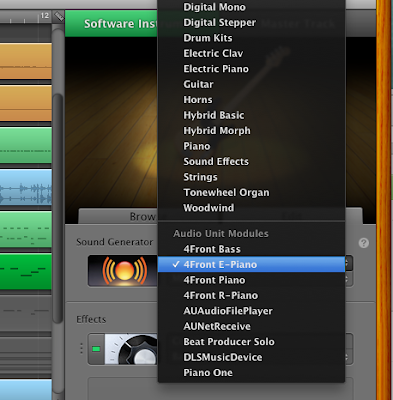 |
| Select your new instrument in the "Audio Unit Modules" section |
If you want the instrument to show up on the Browse tab in the correct list, then follow these steps:
- Select the instrument group on the Browse tab that you want the instrument to be saved into, and the select icon that you want to be used.
- Click the Edit tab and select the instrument as the Sound Generator
- Adjust any instrument settings or Effects
- Click on "Save Instrument..." and enter the name for this instrument
Obviously the choice of free instruments available is not as broad as those available for purchase, but there are some good ones
out there. There is a good freeware AU list at
Don't Crack.com and an extensive list at
KVR Audio, although many are only VST plugins, not AU. Just remember that you get what you pay for, so don't be upset if some don't work well.
UPDATE: You can also find a good selection of plugins which are available in AU format in "
The 27 best free VST plug-ins in the world today" (2012) on
MusicRadar.com
Soundfonts (.sf2)
Another option for expanding your instrument arsenal is
Soundfonts. These files have been around since the 1990s, so there is a large variety in both instruments and quality. There are probably a lot more
There are a few quirks about using these for instrument sounds. GarageBand will use .sf2 files, but not the archive formats .sfark or .sfpack. Both these formats appear to be abandoned now and unpacking the soundfonts on OSX is next to impossible.
Although some soundfonts are available as "collections", these are a little less easy to use in GarageBand. Unless you can send a MIDI Program Change to the track, you'll be stuck using the first sound/voice in that collection. I tend to use single instrument soundfonts so that I can save them as an instrument once installed.
Some sources I have used for .sf2 soundfont files are
HammerSound,
ЯK Hive,
NTONYX and
www.johannes.fr. Probably the largest soundfont archive is
sf2midi.com, although it has some drawbacks: you need to register to download, the free downloads are slow (and require too many clicks in my opinion), and the zip files cannot be opened by OSX's Archive Utility (10.6) - luckily they can be unzipped by the free app
The Unarchiver. Nearly all of the .sf2 files I have tried to date have worked well, but some just don't work.
Here's the process to install and use a soundfont in GarageBand:
- Find and download the desired soundfont .sf2 file
- Copy the file to Library/Audio/Sounds/Banks
- Quit GarageBand if it is running
- Open GarageBand and open a project
- Create a new Software Instrument track and open the Track Info pane ( ⌘+I )
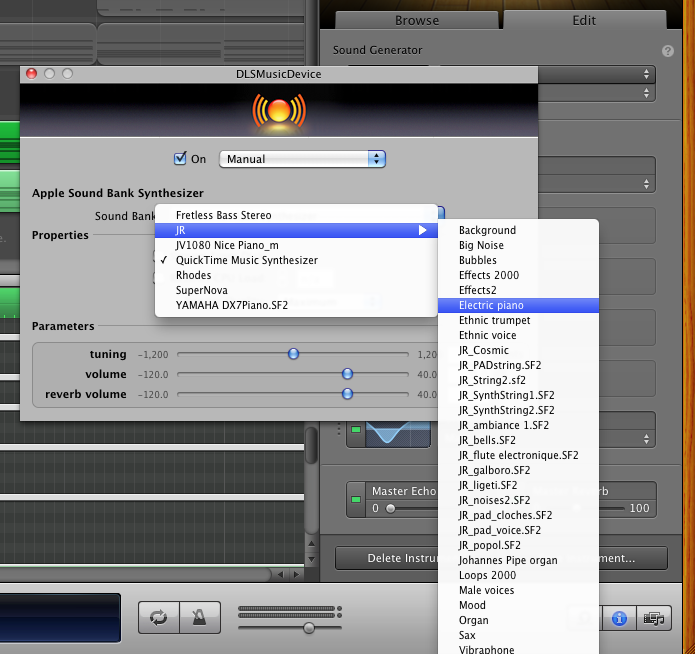
- Click the Edit tab and then the Sound Generator list and select DLSMusicDevice from the Audio Unit Modules section
- Double-Click the large button to the left of the DLSMusicDevice to edit the settings
- Select your soundfont in the Apple Sound Bank Synthesizer list (QuickTime Music Synthesizer is the default value)
You can save the soundfont instrument so it is listed on the Browse tab by using the same steps outlined above for AU Instruments.
Pro Tip: If you want to organise your soundfont files into instrument types, or to keep a set of files together, etc. then you can create folders within Library/Audio/Sounds/Banks folder and this will be reflected in the Sound Bank list.
UPDATE 28-OCT-2012: I just found this post that links to downloads for "
3.5 Gigabytes Of HQ Orchestral SF2" at newgrounds.com. I haven't tried them all yet, but those that I have tried are sounding pretty good. I also discovered
freesf2.com which also has some great free SF2 files (although you'll need sfArk).
UPDATE 25-FEB-2014: Blogger's stats tell me that this post is getting quite a bit of traffic and that a chunk of that is coming from
thegaragebandguide.com :)

.PNG)